New Daily Check-in and Points Store Complete Guide: Telegram Video Downloader 2.6.8.8 Check-in Rewards and VIP Redemption Tutorial
Telegram Video Downloader 2.6.8.8 Update Notes: Daily Check-in and Points Store

Telegram Video Downloader
After Chrome updates the extension in the background, this page may open automatically even if you have not opened the extension panel.
It is the green download button you use on Telegram Web.

- Start Daily Check-in from the extension
- Claim download uses and points rewards
- Use points to redeem VIP vouchers
Telegram Video Downloader 2.6.8.8 adds a Daily Check-in and points reward entry. After updating, users can start Daily Check-in directly from the Telegram extension panel, claim Telegram extension-exclusive download uses and account points, and then redeem points for 3-day, 7-day, or 15-day VIP vouchers. This update also connects the voucher wallet, voucher code claiming, feedback rewards, and points history, so extension rewards can accumulate over time and be used as needed.
This Extension Update at a Glance
| Feature | What changed in Telegram Video Downloader 2.6.8.8 |
|---|---|
| Daily Check-in | The extension panel adds Daily Check-in, starting Telegram Daily Check-in from the extension |
| Telegram download reward | Each valid check-in currently rewards 5 Telegram extension download uses, valid for 2 days |
| Account points | Check-in points go to the currently logged-in DownloadVideos365 account and can be viewed in the extension |
| Points store | Points can be redeemed for 3-day, 7-day, or 15-day VIP vouchers |
| VIP voucher | You can first save it to the voucher wallet and activate it later, or redeem and immediately stack VIP validity |
| Records and feedback | You can view points history, claim voucher codes, and participate in reward review through genuine product feedback |
Complete Daily Check-in from the Telegram Extension
The new check-in flow starts from the Telegram Video Downloader extension. The extension confirms the currently logged-in account and starts check-in; the official website page handles security verification, records the reward, and displays the result.
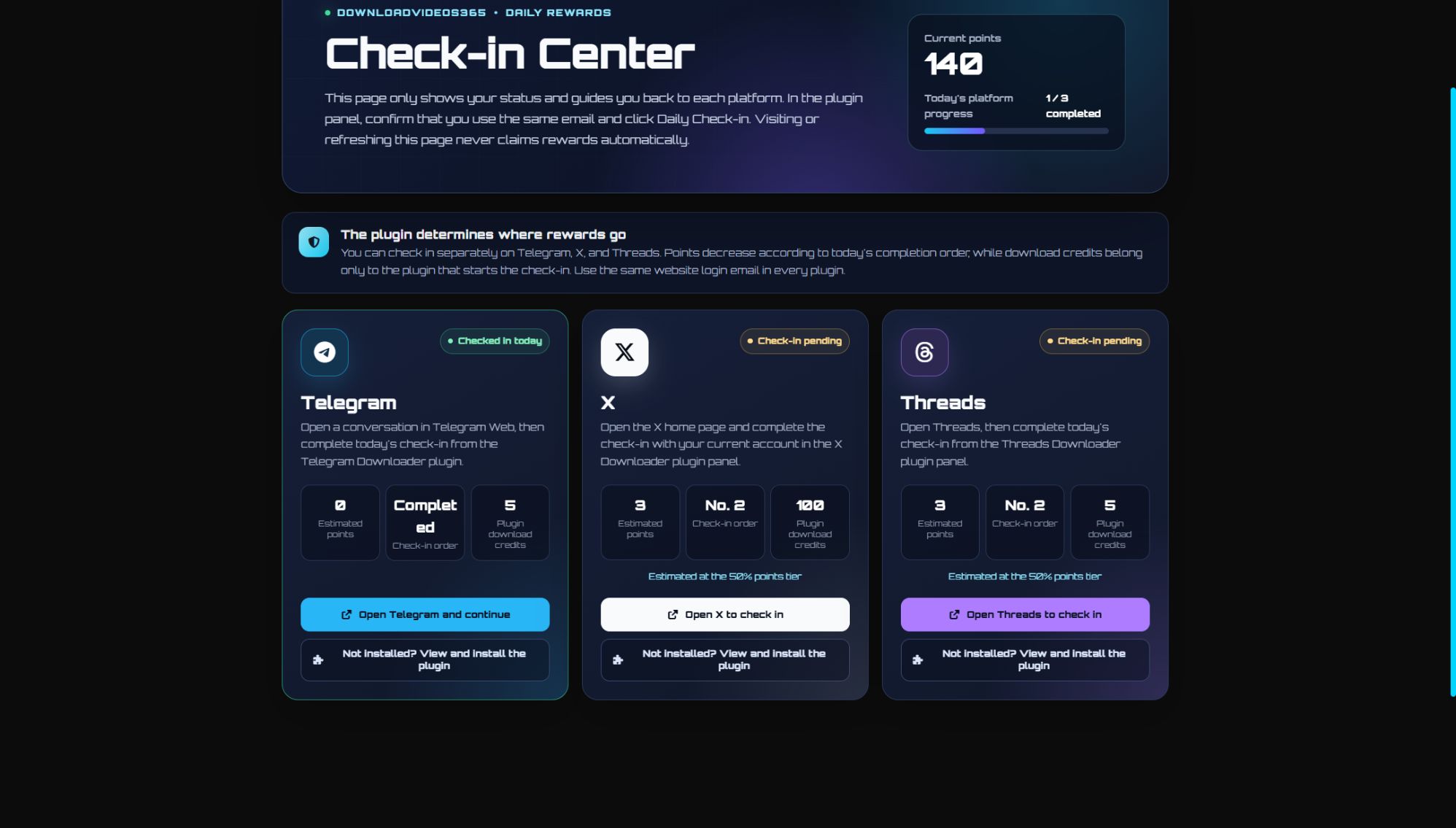
Please look at the Telegram card on the left side of the full interface. The image above shows an example status after completing Telegram check-in for the day; it displays the check-in result, actual or estimated points, and Telegram extension-exclusive download uses.
How to Complete a Telegram Check-in
- Update Telegram Video Downloader to 2.6.8.8 and refresh the Telegram Web page.
- Make sure the extension and the DownloadVideos365 website are logged in with the same email.
- Open the extension panel and click
Daily Check-in. - Follow the page prompts to complete the official website check-in flow, then return to the extension or refresh the check-in page to view the latest status.
The extension associates this check-in with the current account through a one-time security flow. If the website and extension are logged in with different emails, the reward will go to the account actually logged in by the extension, so it is recommended to verify the email before checking in.
Opening the Check-in Page Alone Does Not Claim the Reward
The official website check-in page is a status dashboard. Opening or refreshing the page does not automatically add points, nor does it add Telegram download uses. A valid check-in must be started from the Telegram Video Downloader extension so that the system can accurately credit the 5 download rewards to the Telegram extension.
Reopening the flow on the same day will not issue the reward again. The final result is subject to the check-in status returned by the server, not the button state or local cache.
What You Can Get from Telegram Check-in
Currently, each valid Telegram Daily Check-in includes two parts of rewards:
- 5 Telegram extension download uses: for Telegram Video Downloader only, currently valid for 2 days.
- Account points: go to the same DownloadVideos365 account and can be used to redeem VIP vouchers. If this is the account's first check-in of the day, the current base reward is 5 points.
If the same account has already checked in that day through another product that supports points, the points earned from Telegram this time may be adjusted according to the account's check-in order for the day. The current common points tiers shown on the page are 5, 3, and 1; the actual value is subject to the estimated points shown before check-in and the result after check-in. The account points order does not change the Telegram-exclusive 5 download rewards.
Redeem VIP with Check-in Points
Open the points entry in the Telegram Video Downloader user panel to enter the points redemption store. The top of the page shows the current points and VIP validity period, and below you can choose VIP vouchers of different durations.
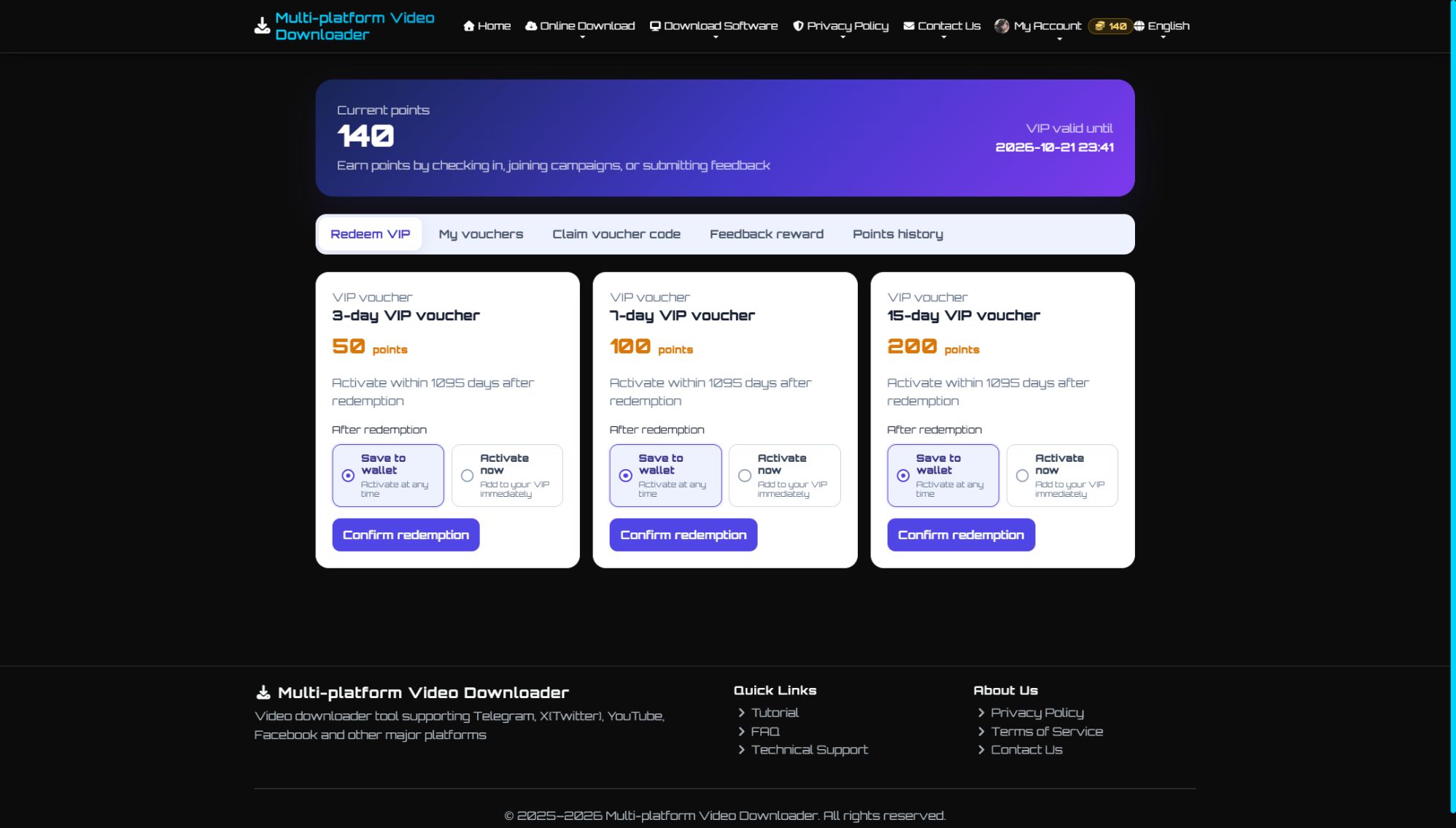
Before redeeming, you can compare the points required and choose to save the VIP voucher to the voucher wallet or activate it immediately.
Currently Redeemable VIP Vouchers
| VIP voucher | Points required | Suitable scenario |
|---|---|---|
| 3-day VIP voucher | 50 points | Temporary intensive downloads or short-term trial |
| 7-day VIP voucher | 100 points | Continuous use within one week |
| 15-day VIP voucher | 200 points | Longer continuous use |
Products, points required, and event status may be adjusted later. Before redeeming, please refer to the real-time information displayed on the store page.
Save to Voucher Wallet or Activate Immediately
- Save to voucher wallet: after a successful redemption, the current VIP is not changed for now; you can go to 'My Voucher Wallet' to activate it when needed. The default activation deadline currently shown on the page is 1095 days after redemption.
- Activate immediately: after redemption, VIP days increase right away. If you already have unexpired VIP, the new days will continue after the original expiration time; if VIP has expired, it will start counting from activation.
View Points and Reward Records in the Extension
The points entry in Telegram Video Downloader 2.6.8.8 can not only open the store but also manage the following account benefits:
- My Voucher Wallet: view the source, claim time, activation deadline, and current status of VIP vouchers.
- Claim voucher code: enter the VIP voucher code you received and choose to save it to the voucher wallet or activate it immediately.
- Feedback rewards: submit genuine extension usage experiences or issues, optionally with screenshots; review results and rewards will be handled according to the page instructions.
- Points history: view every points change generated by check-in, redemption, and event rewards.
Where to Access the New Features
After updating and logging in to Telegram Video Downloader, you can use the following entries:
Daily Check-inin the extension user panel: start the day's Telegram check-in.- The points or rewards entry in the extension user panel: view the balance and enter the VIP redemption store.
- View Telegram check-in status.
- Open the points redemption store.
- Claim new-version event points: go to the event page to view the rules and claim; each account can claim once.
If the extension panel still shows the old interface, first confirm the version number is 2.6.8.8, then refresh Telegram Web. If necessary, reload the extension or reopen the browser.
FAQ
Does opening the official website check-in page count as completing Telegram check-in?
No. The official website page only displays status; you must click Daily Check-in in the Telegram Video Downloader extension panel to start a valid check-in.
How much is the Telegram Daily Check-in reward?
Currently, each valid check-in rewards 5 Telegram extension download uses, valid for 2 days, and also grants account points. If this is the first check-in for the same account that day, the current base points are 5; the final amount is subject to what the page actually displays.
Why does the estimated points shown for Telegram check-in change?
Points take into account the check-in order already completed that day by the same DownloadVideos365 account. Even if the estimated points change, the Telegram-exclusive 5 extension download rewards are still issued according to the current rules.
Can download uses earned from check-in be used for other extensions?
No. Download uses belong to Telegram Video Downloader and can only be used for Telegram downloads; account points can be redeemed uniformly for VIP vouchers in the points store.
What if the website and extension are logged in with different emails?
Rewards will go to the account actually logged in by the Telegram extension. We recommend logging the extension and website into the same email before starting check-in and redemption.
Should a VIP voucher be saved to the voucher wallet or activated immediately?
If you will use it soon, choose 'Activate now'; if you want to save it for later, choose 'Save to voucher wallet'. If you already have unexpired VIP, activating now will stack after the original expiration date.
Why is Daily Check-in or the points entry not in the extension?
Please confirm that Telegram Video Downloader has been updated to 2.6.8.8, and refresh Telegram Web. If it still does not appear, reload the extension or restart the browser and try again.
Try Telegram Video Downloader 2.6.8.8 Now
After updating, open Telegram Web, log in to the extension, and click Daily Check-in to claim today's reward. After check-in is complete, you can view the balance, points history, and redeemable VIP vouchers from the extension's points entry.
To install, reinstall, or view extension usage instructions, please visit Telegram Video Downloader extension page.