Daily Check-in and Points Store Guide: Telegram Video Downloader 2.6.8.8 Check-in Rewards and VIP Redemption
Telegram Video Downloader 2.6.8.8 Update: Daily Check-in and Points Store
Telegram Video Downloader 2.6.8.8 adds a daily check-in and a points reward entry point. After updating, users can start Daily Check-in directly from the Telegram extension panel, claim Telegram-extension-exclusive download credits and account points, and then redeem those points for 3-day, 7-day, or 15-day VIP coupons. This update also connects the coupon vault, coupon-code redemption, feedback rewards, and points history, so extension rewards can keep accumulating and be used as needed.
What changed in this extension update
| Feature | What changed in Telegram Video Downloader 2.6.8.8 |
|---|---|
| Daily check-in | New Daily Check-in in the extension panel; the Telegram daily check-in starts from the extension |
| Telegram download reward | A valid check-in currently grants 5 Telegram extension download credits, valid for 2 days |
| Account points | Check-in points go to the currently signed-in DownloadVideos365 account and can be viewed inside the extension |
| Points store | Redeem points for 3-day, 7-day, or 15-day VIP coupons |
| VIP coupons | Store a coupon in the vault for later activation, or activate it immediately to extend the VIP period |
| Records and feedback | View points history, claim coupon codes, and take part in reward review through genuine product feedback |
Complete your daily check-in from the Telegram extension
The new check-in flow starts in the Telegram Video Downloader extension. The extension confirms the currently signed-in account and starts the check-in, while the website page handles the security verification, records the reward, and displays the result.
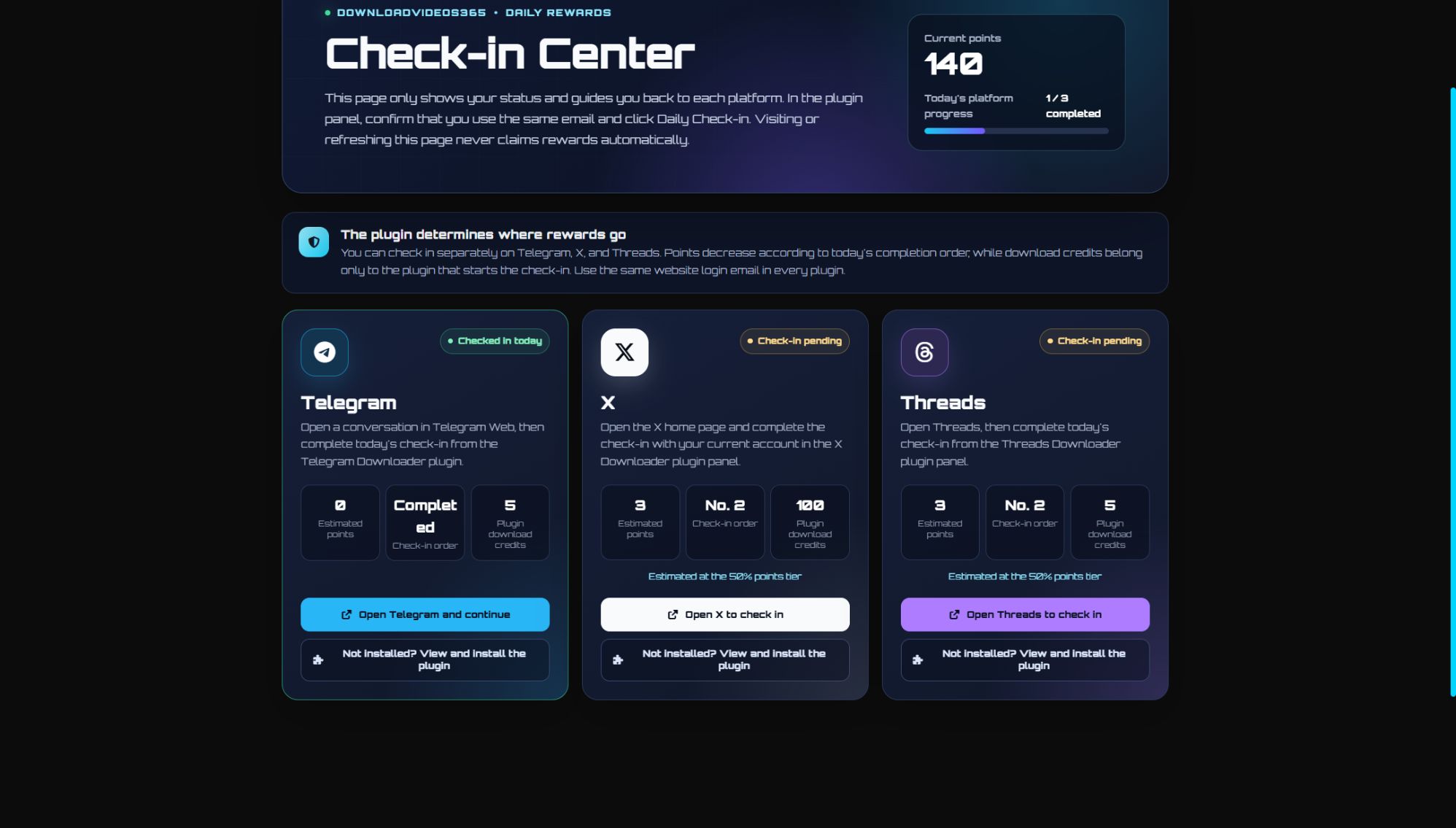
Look at the Telegram card on the left of the full interface. The image above shows an example of the Telegram state after the day's check-in is complete; it displays the check-in result, the actual or estimated points, and the Telegram extension's exclusive download credits.
How to complete a Telegram check-in
- Update Telegram Video Downloader to 2.6.8.8 and refresh the Telegram Web page.
- Make sure the extension and the DownloadVideos365 website are signed in with the same email address.
- Open the extension panel and click
Daily Check-in. - Follow the on-page instructions to finish the website check-in flow, then return to the extension or refresh the check-in page to see the latest status.
The extension links this check-in to your account through a one-time secure flow. If the website and the extension are signed in with different email addresses, the reward goes to the account actually signed in on the extension, so check the email address before checking in.
Opening the check-in page alone does not claim the reward
The website check-in page is a status dashboard. Opening or refreshing it does not automatically add points, and it does not add Telegram download credits either. A valid check-in must be started by the Telegram Video Downloader extension, which is how the system credits the 5 download credits to the Telegram extension precisely.
Repeating the flow on the same day does not grant the reward again. The final result is based on the check-in status returned by the server, not on the button state or local cache.
What a Telegram check-in gives you
Each valid Telegram daily check-in currently includes two parts:
- 5 Telegram extension download credits: for use in Telegram Video Downloader only, currently valid for 2 days.
- Account points: credited to the same DownloadVideos365 account and usable for redeeming VIP coupons. If this is the account's first check-in of the day, the current base reward is 5 points.
If the same account has already checked in that day through another product that supports points, the points earned from this Telegram check-in may be adjusted according to the account's check-in order for the day. The point tiers currently seen on the page are 5, 3, and 1; the actual number is based on the estimated points shown before check-in and the result after check-in. The account point order does not change the Telegram-exclusive 5 download credits.
Redeem check-in points for VIP
Open the points entry in the Telegram Video Downloader user panel to reach the points redemption store. The top of the page shows your current points and VIP expiry date, and below that you can choose VIP coupons of different durations.
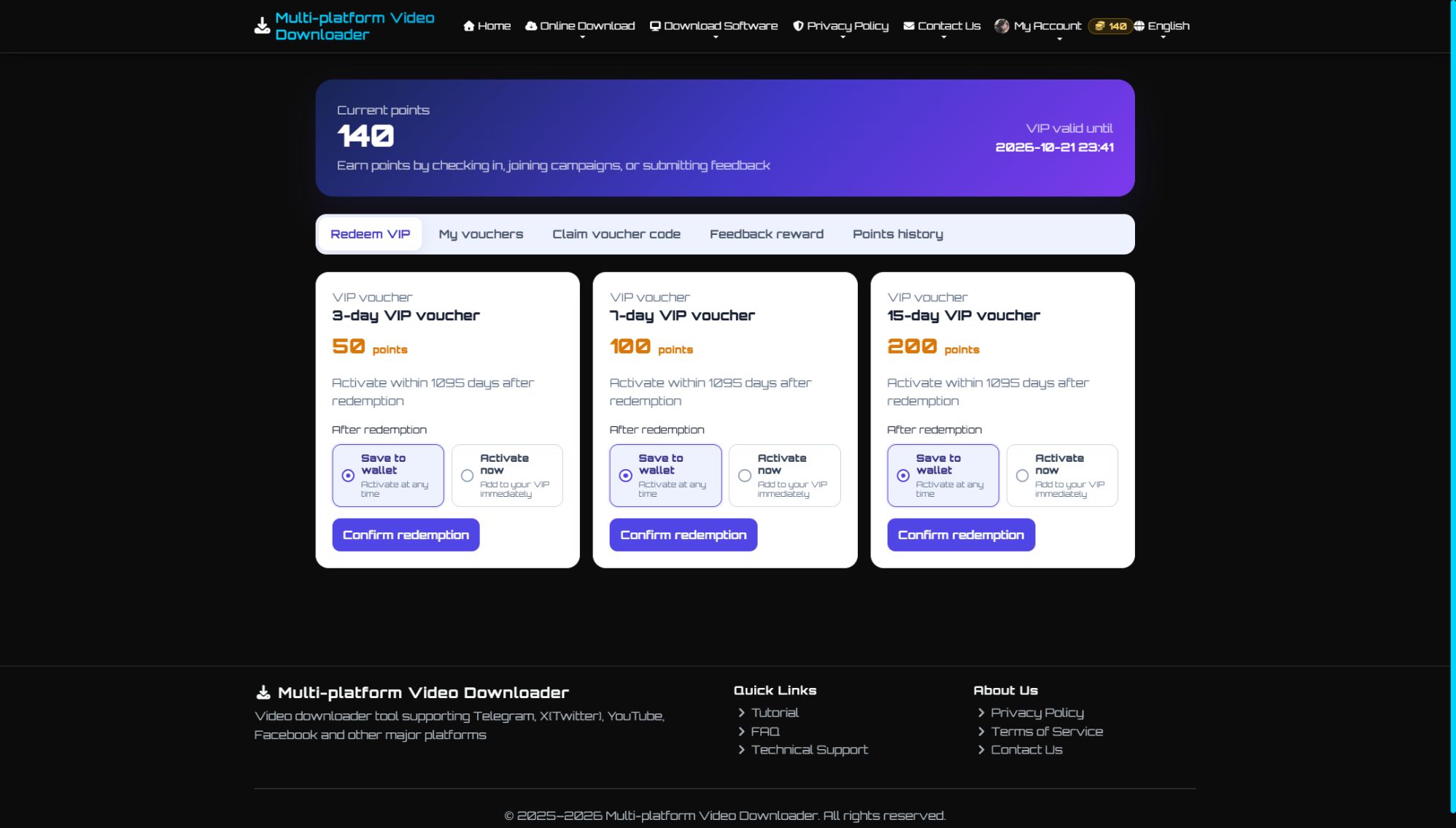
Before redeeming, you can compare the points required and choose whether to store the VIP coupon in the vault or activate it immediately.
VIP coupons available now
| VIP coupon | Points required | Good for |
|---|---|---|
| 3-day VIP coupon | 50 points | A short, focused burst of downloads or a brief trial |
| 7-day VIP coupon | 100 points | Continuous use within a single week |
| 15-day VIP coupon | 200 points | Longer, continuous use |
Items, points required, and campaign status may be adjusted later; before redeeming, check the live information shown on the store page.
Store in the coupon vault or activate immediately
- Store in the coupon vault: after a successful redemption your current VIP stays unchanged, and you can activate the coupon later from My Coupon Vault when you need it. The default activation deadline shown on the current page is 1095 days after redemption.
- Activate immediately: your VIP days increase right after redemption. If you already have an unexpired VIP, the new days continue from the existing expiry date; if your VIP has expired, the period starts at the time of activation.
View points and reward records in the extension
The points entry in Telegram Video Downloader 2.6.8.8 does more than open the store; it also manages these account benefits:
- My Coupon Vault: view where a VIP coupon came from, when it was claimed, its activation deadline, and its current status.
- Claim a coupon code: enter a VIP coupon code you received and choose to store it in the vault or activate it immediately.
- Feedback rewards: submit genuine experience with the extension or problems you ran into, optionally with screenshots; the review result and reward are handled as described on the page.
- Points history: view every points change produced by check-ins, redemptions, and campaign rewards.
Where to find the new features
After updating and signing in to Telegram Video Downloader, you can use these entry points:
Daily Check-inin the extension user panel: start the day's Telegram check-in.- The points or rewards entry in the extension user panel: check your balance and open the VIP redemption store.
- View Telegram check-in status
- Open the points redemption store
- Claim the new campaign points: go to the campaign page to review the rules and claim them; each account can claim once.
If the extension panel still shows the old interface, first confirm that the version number is 2.6.8.8, then refresh Telegram Web. If necessary, reload the extension or restart your browser.
FAQ
Does opening the website check-in page count as completing the Telegram check-in?
No. The website page only shows status; you have to click Daily Check-in in the Telegram Video Downloader extension panel to start a valid check-in.
What is the Telegram daily check-in reward?
A valid check-in currently grants 5 Telegram extension download credits, valid for 2 days, along with account points. If this is the same account's first check-in of the day, the current base reward is 5 points; the actual points shown on the page are what count.
Why does the estimated points shown for the Telegram check-in change?
Points take into account the check-ins already completed that day by the same DownloadVideos365 account. A change in estimated points does not affect the Telegram-exclusive 5 extension download credits.
Can the download credits from a Telegram check-in be used in other extensions?
No. Download credits belong to Telegram Video Downloader and can only be used for Telegram downloads; account points can be redeemed for VIP coupons in the points store.
What if the website and the extension are signed in with different email addresses?
The reward goes to the account actually signed in on the Telegram extension. It is best to sign in to the extension and the website with the same email address before checking in or redeeming.
Should a VIP coupon be stored in the vault or activated immediately?
If you are going to use it soon, choose Activate immediately; if you want to keep it for later, choose Store in the vault. If you already have an unexpired VIP, activating immediately adds the new days after the current expiry date.
Why is there no Daily Check-in or points entry in the extension?
Check that Telegram Video Downloader has been updated to 2.6.8.8 and refresh Telegram Web. If it still does not appear, try reloading the extension or restarting the browser and then try again.
Try Telegram Video Downloader 2.6.8.8 now
Once the update is done, open Telegram Web, sign in to the extension, and click Daily Check-in to claim today's reward. After the check-in is complete, you can open the points entry in the extension to see your balance, your points history, and the VIP coupons available for redemption.
To install the extension, reinstall it, or read how it works, visit Telegram Video Downloader extension page.